📖 插件介紹
當有地震發生時,插件能立即推送通知,顯示震央位置、規模與震度資訊。
使用者可以自行設定所在地與預警震度,當地震達到或超過該設定值時,才會觸發提醒,避免過度打擾。
插件內建語音播報功能,可在第一時間以語音提醒使用者,讓你即使沒有盯著螢幕,也能即時獲得地震警報。
當地震可能引發海嘯時,插件將立即發送海嘯警報,並顯示預估海嘯到達時間與影響範圍,提醒使用者保持警戒。
此外,插件支援API 調用,方便其他插件或服務串接。
⚠️ 使用前請詳閱「關於地震速報」,如繼續使用,即視為了解且同意該頁面內容。
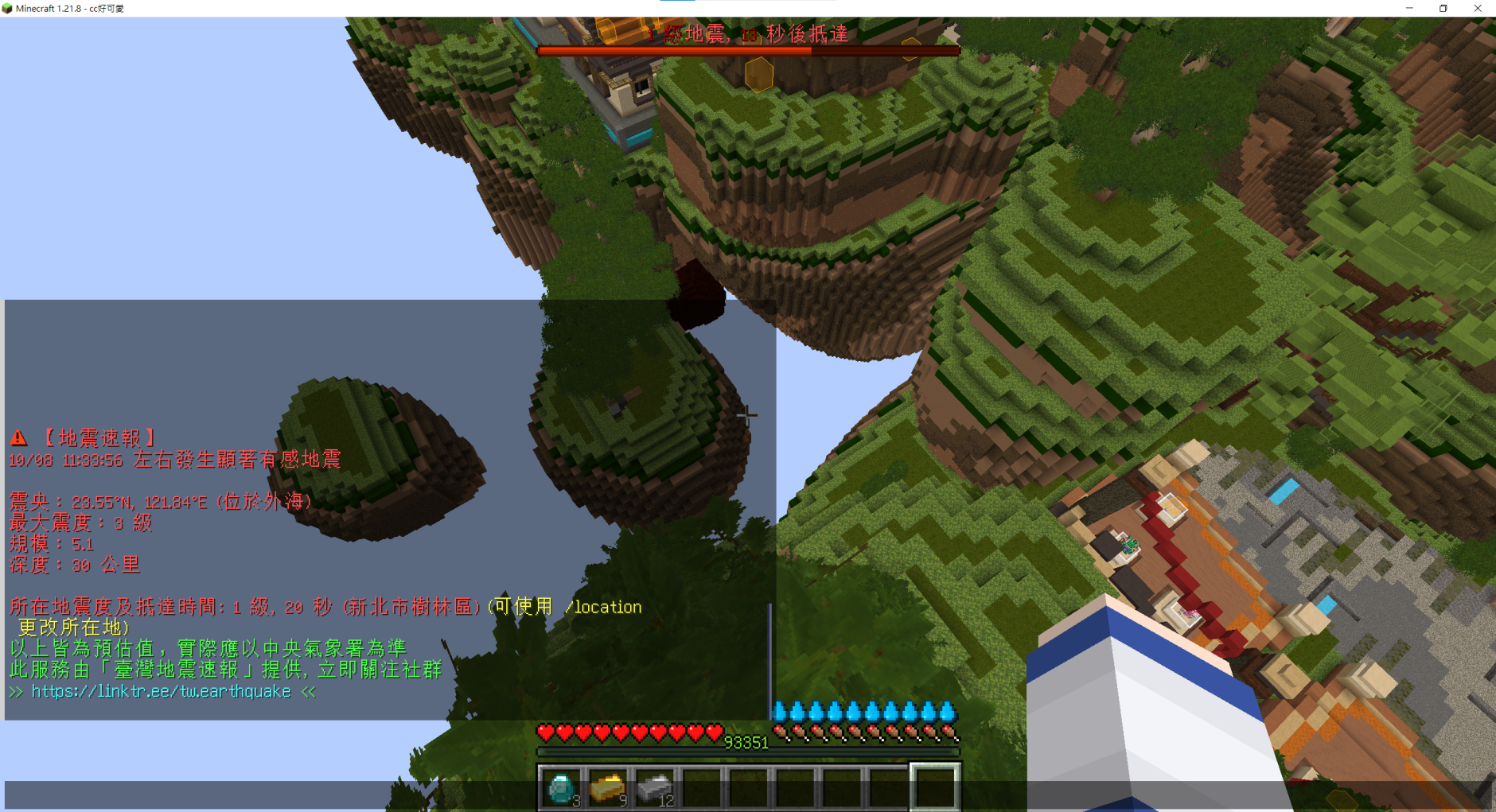
✨ 功能特色
- ⚡ 即時地震速報推送
- 📍 顯示震央位置與詳細資訊
- 🔔 自動發出音效與語音播報提醒
- 🌊 海嘯警報功能:提供到達時間與影響區域
- 🌐 支援台灣主要城市與區域
- ⚙️ 自訂所在地與預警震度
- 🛠️ 提供API 介面,可供外部應用程式使用
📥 下載與安裝
你可以從以下來源取得最新版本:
💡 支援版本: Minecraft 1.21.X 或以下
立即下載下載後請 聯絡開發人員 以提供後續步驟 (建議使用Discord)
🎧 安裝材質包
此外,請安裝以下材質包,以供播放語音及音效
💡 支援版本: Minecraft 1.21.X 或以下
立即下載🛠️ Developers
To use this plugin api in your project, you need to first include the JAR file manually:
- Download the plugin JAR file (
EarthquakeEarlyWarning.jar). - Copy the JAR file into your project's
libsdirectory (create it if it doesn't exist). - Add the JAR to your project's classpath:
- If using an IDE like Eclipse: Right-click your project → Properties → Java Build Path → Libraries → Add JARs → select the JAR.
-
If using IntelliJ IDEA: File → Project Structure → Modules → Dependencies → + → JARs or directories → select the JAR. And than add the dependency to your pom.xml
<dependency> <groupId>tw.earthquake</groupId> <artifactId>EarthquakeEarlyWarning</artifactId> <version>1.0-SNAPSHOT</version> <scope>system</scope> <systemPath>FILE_PATH/EarthquakeEarlyWarning.jar</systemPath> </dependency> - If using command line: include it when compiling, e.g.,
javac -cp libs/plugin-name.jar src/MyApp.java
- Once the JAR is added to the classpath, you can import the plugin classes and use its API in your code.
depend: [ EarthquakeEarlyWarning ]Class, Event & Example
📌 Event: earthquakeReceived
The earthquakeReceived event is triggered whenever a new earthquake eew is received.
You can listen to this event to handle real-time earthquake data in your plugin.
• Event Usage Example
// Listen for the earthquakeReceived event
@EventHandler
public void onEarthquakeReceived(earthquakeReceived event) {

    // Retrieve the earthquake data, including the level and countdown seconds, for the location "Taipei".
    // You can check the permitted locations below.
    LocationData taipei = event.getLocationData("Taipei");
    int second = taipei.getSecond();
    Level level = taipei.getLevel();

    double latitude = event.getLatitude();     //e.g. 22.53
    double longitude = event.getLongitude();   //e.g. 122.61
    double magnitude = event.getMagnitude();   //e.g. 4.5
    String address = event.getAddress();       //e.g. "台北市中正區公園路64號"
    int depth = event.getDepth();              //e.g. 10
    int time = event.getTime();                //e.g. 1758482415
    Level maxLevel = event.getMaxLevel();      // introducing below

    // DO SOMETHING ELSE...
}
getLocationData(String location)– Returns the earthquake data, including the level and countdown seconds, for the location "location" as aLocationDataobject.getLatitude()– Returns the latitude of the earthquake epicenter.getLongitude()– Returns the longitude of the earthquake epicenter.getMagnitude()– Returns the magnitude of the earthquake in Mw.getAddress()– Returns the fuzzy address of the earthquake epicenter.getDepth()– Returns the depth of the earthquake in kilometers.getTime()– Returns the timestamp of the earthquake in UNIX format.getMaxLevel()– Returns the estimated maximum intensity for this earthquake.setCancelled(boolean cancel)– Cancels the propagation of the event if set totrue. Useful when you want to cancel this eew event, or stop other plugins or listeners from handling this event.isCancelled()– Returns whether the event has been cancelled by any listener
📌 Event: tsunamiReceived
The tsunamiReceived event is triggered whenever a new tsunami warning is received.
You can listen to this event to handle real-time tsunami data in your plugin.
• Event Usage Example
// Listen for the tsunamiReceived event
@EventHandler
public void onTsunamiReceived(tsunamiReceived event) {

    // Retrieve the tsunami data, including the arrival time and wave height, for the area "北部沿海地區".
    // The permitted areas are the "北部沿海地區", "東北沿海地區", "東部沿海地區", "東南沿海地區", "西南沿海地區" and "海峽沿海地區".
    AreaData northArea = event.getAreaData("北部沿海地區");
    String arrivalTime = northArea.getArrivalTime();
    String waveHeight = northArea.getWaveHeight();

    double latitude = event.getLatitude();     //e.g. 53.0
    double longitude = event.getLongitude();   //e.g. 160.8
    double magnitude = event.getMagnitude();   //e.g. 7.8
    String address = event.getAddress();       //e.g. "俄羅斯堪察加半島"
    String source = event.getSource();         //e.g. "美國太平洋海嘯警報中心"
    String content = event.getContent();       //e.g. "頃獲太平洋海嘯警報中心通報...注意海浪突然湧升所造成的危害。"
    int depth = event.getDepth();              //e.g. 10
    String time = event.getTime();             //e.g. "2025-09-19 02:58:00"

    // DO SOMETHING ELSE...
}
getAreaData(String area)– Returns the tsunami data, including the arrival time and wave height, for the area "area" as aAreaDataobject.getLatitude()– Returns the latitude of the earthquake epicenter.getLongitude()– Returns the longitude of the earthquake epicenter.getMagnitude()– Returns the magnitude of the earthquake in Mw.getAddress()– Returns the fuzzy address of the earthquake epicenter.getSource()– Returns the tsunami warning source.getContent()– Returns the tsunami warning content.getDepth()– Returns the depth of the earthquake in kilometers.getTime()– Returns the timestamp of the earthquake in "YYYY-MM-DD HH:mm:SS" format.setCancelled(boolean cancel)– Cancels the propagation of the event if set totrue. Useful when you want to cancel this tsunami warning event, or stop other plugins or listeners from handling this event.isCancelled()– Returns whether the event has been cancelled by any listener
📌 Class: LocationData
The LocationData class represents earthquake information for a specific location.
It allows you to access key details such as the estimated intensity and the time in seconds for the earthquake alert.
earthquakeReceived event. Using it elsewhere may result in errors.
• Usage Example
LocationData taipei = event.getLocationData("Taipei");
int second = taipei.getSecond();      // e.g. 12
Level level = taipei.getLevel();      // introducing below
getLevel()– Returns the predicted earthquake intensity for this location as aLevelobject.getSecond()– Returns the countdown time in seconds for the earthquake alert at this location as anint.
This class is useful for handling location-specific earthquake data within the plugin's API, allowing developers to access real-time intensity and timing information for different regions.
Available location parameters can be found below:
📌 Class: AreaData
The AreaData class represents tsunami information for a specific area.
It allows you to access key details such as the estimated arrival time and wave height for the tsunami warning.
tsunamiReceived event. Using it elsewhere may result in errors.
• Usage Example
AreaData northArea = event.getAreaData("北部沿海地區");
String arrivalTime = northArea.getArrivalTime();    // "2025-07-30 13:41:00"
String waveHeight = northArea.getWaveHeight();      // "小於0.3公尺"
getArrivalTime()– Returns the arrival time for this area.getWaveHeight()– Returns the wave height for this area. If there is no wave height for this area, returns "注意"
This class is useful for handling area-specific tsunami data within the plugin's API, allowing developers to access real-time arrival time and wave height information for different regions.
Available area parameters can be found below:
"北部沿海地區", "東北沿海地區", "東部沿海地區", "東南沿海地區", "西南沿海地區", "海峽沿海地區"
📌 Class: Level
The Level class represents the predicted earthquake intensity for a specific location.
It provides convenient methods to retrieve the intensity as a string or integer and to compare intensity levels.
// Create Level objects
Level level1 = new Level("3 級");
Level level2 = new Level(2);       // corresponds to "2 級"
Level level3 = new Level("5 弱");
Level(String level)– Creates a Level object using a string, e.g.,"3 級", "5 弱".Level(int level)– Creates a Level object using an integer. If the integer is invalid, it defaults to"0 級". You can check the permitted integer below.
// Get values
int index = level1.getInt();            // 3
String levelStr = level1.getString();   // "3 級"

// Compare levels
boolean higher1 = level1.isBiggerThan(2);        // true
boolean higher2 = level1.isBiggerThan("2 級");   // true
boolean higher3 = level1.isBiggerThan(level2);   // true
boolean higher4 = level1.isBiggerThan(7);        // false
getInt()– Returns the level as a integer.getString()– Returns the level as a string, e.g.,"3 級", "5 弱".isBiggerThan(int level)– Returnstrueif this level is greater than or equal to the given integer level.isBiggerThan(String level)– Returnstrueif this level is greater than or equal to the given level string.isBiggerThan(Level level)– Returnstrueif this level is greater than or equal to another Level object.
- 0 → "0 級"
- 1 → "1 級"
- 2 → "2 級"
- 3 → "3 級"
- 4 → "4 級"
- 5 → "5 弱"
- 6 → "5 強"
- 7 → "6 弱"
- 8 → "6 強"
- 9 → "7 級"
This class is designed to make it easy to compare earthquake intensity levels and retrieve the level in both string and integer formats.